WEBSITE HOSTING
When Should You Move Your WordPress Website to Better Hosting?
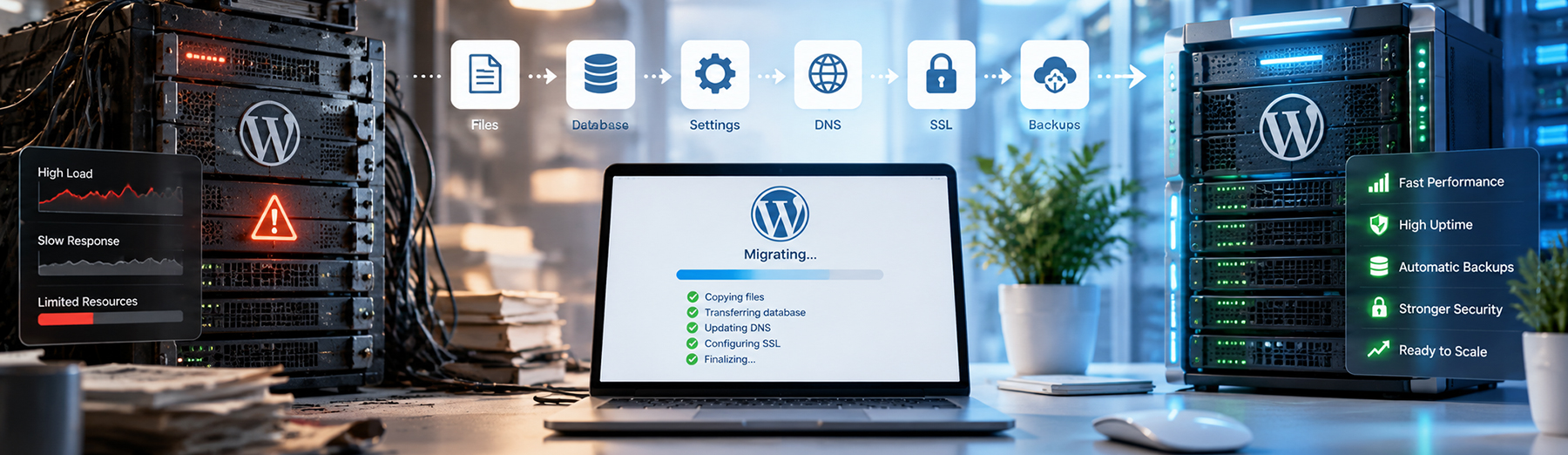
A WordPress website can outgrow its hosting environment long before the site completely fails. Slow load times, resource limits, recurring downtime, weak support, staging limitations, and poor scalability can all be signs that the current hosting plan is holding the website back.
Moving to better hosting is usually not about chasing the most expensive platform. It is about recognizing when the current environment no longer supports the website’s performance, reliability, security, and business requirements.

How Do You Know When Your WordPress Hosting Is No Longer Enough?
A WordPress website may outgrow its hosting before the problem becomes obvious. The clearest warning signs usually appear as recurring performance, reliability, or resource issues rather than one isolated slowdown.
Common signs include:
- Pages becoming slower over time
- Frequent CPU or memory-limit warnings
- Downtime during traffic spikes
- Slow WordPress admin performance
- Database queries taking longer to complete
- Backups failing or taking too long
- Limited staging or development tools
- Recurring 500 or 502 errors
- WooCommerce checkout slowing down
- Security or malware issues returning
- Support unable to resolve recurring problems
- Website growth being limited by the current plan
The key is recurrence. One temporary slowdown does not necessarily mean the host is inadequate, but repeated technical limitations can indicate that the environment is no longer a good fit.
If you are evaluating what a better hosting environment should provide, see our guide on how to choose WordPress hosting for a business website.
Hosting Warning Sign: If the same performance or reliability problems keep returning after basic optimization, the hosting environment may be part of the root cause.
Slow Website Performance That Keeps Returning
Recurring slowness is one of the clearest signs that a WordPress site may be limited by its hosting environment.
You may notice:
- Slow page loads even after optimization
- Delayed WordPress admin screens
- Performance dropping during busy periods
- Slow database-heavy pages
- Checkout or form delays
- Server response times remaining high
- Resource usage regularly hitting plan limits
If image optimization, caching, plugin cleanup, and code improvements do not resolve the problem, the server itself may be the bottleneck.
For recurring speed problems, our Website Maintenance & Performance services can help identify whether the slowdown is coming from hosting, plugins, database activity, front-end code, or other technical bottlenecks.
Performance Warning: If optimization improvements are temporary and the site keeps slowing down, evaluate the hosting environment before continuing to add more performance plugins or workarounds.
Frequent Resource Limits or Server Errors
Repeated server-side errors can be another sign that a WordPress site has outgrown its current hosting plan.
Common warning signs include:
- Frequent 500 or 502 errors
- PHP memory exhaustion
- CPU or process limits being reached
- Database connection errors
- Slow or failed background tasks
- Backup jobs timing out
- Large imports or updates failing
- WooCommerce actions stalling under load
Shared hosting can still perform well for smaller websites, but performance may become less predictable as traffic, plugins, and website complexity increase.
These problems can sometimes be caused by plugins or code, so they should be diagnosed carefully. But if errors consistently appear when server resources are under pressure, the hosting environment may need more capacity.
Resource Limit Tip: Do not assume every server error means you need a new host. Confirm whether the issue comes from code, plugins, database load, or actual hosting limits before migrating.
Recurring Downtime or Unreliable Uptime
A business website should be consistently available. If the site goes offline repeatedly, especially during traffic spikes, updates, or routine operations, the hosting environment may no longer be reliable enough.
Warning signs include:
- Frequent short outages
- Downtime during higher-traffic periods
- Slow recovery after server issues
- Repeated maintenance interruptions
- Unexplained availability problems
- Monitoring alerts showing recurring outages
- Support unable to identify or prevent the cause
Occasional outages can happen with any provider, but repeated downtime can affect user trust, lead generation, ecommerce activity, and search engine access.
Reliability Tip: Track uptime over time instead of relying on memory. A pattern of recurring outages is a stronger signal than one isolated incident.
Limited Staging, Backup, or Development Tools
As a WordPress site becomes more important to the business, basic hosting tools can become a limitation.
Warning signs include:
- No reliable staging environment
- Slow or difficult site cloning
- Limited backup retention
- Manual restore processes
- No easy rollback options
- Poor support for development workflows
- Restrictions on SSH, WP-CLI, or other tools
- Difficulty testing updates safely
These limitations may not affect a very small site, but they become more important as the website grows in complexity, traffic, or business value.
Development Workflow Tip: If routine updates, testing, or troubleshooting are risky because the host lacks staging or restore tools, the hosting environment may no longer match the site’s needs.
Poor Support for WordPress-Specific Problems
General hosting support can be enough for simple websites, but as a WordPress site becomes more complex, generic support may not be able to diagnose plugin conflicts, database issues, caching problems, or WordPress-specific errors effectively.
Warning signs include:
- Repeated support tickets for the same issue
- Support blaming WordPress without deeper troubleshooting
- Limited help with PHP, database, or caching problems
- Long response times during critical issues
- No guidance on WordPress-specific configuration
- Difficulty resolving staging or migration problems
- Support unable to explain recurring server errors
- Escalations that do not lead to lasting fixes
Support quality becomes more important when the website is tied to leads, sales, customer service, or other business operations.
Support Tip: If recurring WordPress problems remain unresolved after multiple support interactions, the issue may be both the hosting environment and the level of technical support available.
WooCommerce or High-Traffic Features Are Outgrowing the Hosting
Ecommerce, membership features, large databases, and other dynamic functionality can place much more demand on a WordPress hosting environment than a simple brochure site.
Warning signs include:
- WooCommerce checkout slowing down
- Cart or account pages responding slowly
- Traffic spikes causing performance drops
- Large product catalogs slowing database queries
- Background jobs taking too long
- Imports or exports timing out
- Search or filtering becoming sluggish
- Third-party integrations increasing server load
These issues do not automatically mean the website needs a new host, but recurring slowdowns under normal business activity can indicate that the current plan is no longer providing enough resources.
Growth Tip: Hosting requirements should grow with the website. If ecommerce, traffic, or dynamic features keep increasing server demand, the hosting environment may need to scale with them.
Security or Backup Limitations Are Becoming a Business Risk
Hosting limitations can also become a reason to move when the current environment does not provide enough protection, recovery options, or visibility for a business-critical WordPress site.
Warning signs include:
- Infrequent or unreliable backups
- No easy restore process
- Limited backup retention
- Weak malware monitoring
- No firewall or bot protection
- Recurring security incidents
- Difficulty accessing security or server logs
- No practical way to test recovery
- Limited support after a compromise
A stronger hosting environment can provide additional layers of protection and make recovery faster if something goes wrong.
Security & Recovery Tip: Better hosting should not only reduce risk—it should also make it easier to restore the website quickly when a problem occurs.
Your Hosting Plan Is Limiting Website Growth
Sometimes the strongest reason to move hosting is not a failure—it is that the current environment is starting to restrict what the website can become.
Growth-related limitations may include:
- Traffic limits that are becoming restrictive
- Inability to add resource-heavy functionality
- Limited support for larger databases
- Restrictions on staging or development workflows
- Poor handling of marketing traffic spikes
- Limited scalability for ecommerce
- Difficulty adding new integrations
- Storage or bandwidth constraints
- Increasing maintenance time
- Hosting restrictions affecting future development
If the hosting plan repeatedly forces workarounds, limits new functionality, or makes growth harder, the environment may no longer align with the website’s business role.
Growth Planning Tip: Hosting should support where the website is going, not just where it is today. Repeated technical limits can become a bottleneck for future development and marketing growth.
What Should You Evaluate Before Moving to Better Hosting?
Before migrating a WordPress website, confirm that hosting is actually part of the problem and that the new environment can address the limitations you are experiencing.
Evaluate:
- Current server response times
- CPU, memory, and process usage
- Website traffic patterns
- Database size and activity
- Plugin and theme requirements
- WooCommerce or membership functionality
- Backup and restore needs
- Staging requirements
- Security and monitoring features
- Support quality
- Migration assistance
- Scalability for future growth
Also review whether any current performance issues are caused by code, plugins, database problems, or third-party services. Moving a poorly optimized website to a stronger server may improve performance, but it will not automatically fix every technical issue.
For a broader comparison of hosting options, see our guide on Managed WordPress Hosting vs. Shared Hosting: Which Is Better?
Hosting Evaluation Tip: Choose a new host based on the specific limitations you need to solve—not simply because another provider advertises faster hosting.
How to Plan a WordPress Hosting Migration
Once you decide the current hosting environment is no longer a good fit, the migration should be planned carefully to reduce downtime, broken functionality, SEO issues, and data loss.
A migration plan should include:
- Creating a full website backup
- Documenting the current DNS setup
- Reviewing SSL and CDN configuration
- Setting up the new hosting environment
- Migrating files and the database
- Testing the site on the new host before launch
- Checking forms, ecommerce, and integrations
- Reviewing redirects and URL behavior
- Confirming email is not affected
- Updating DNS only after testing
- Monitoring the site after launch
For ecommerce or highly active websites, migration timing also matters because orders, customer data, or form submissions may continue changing during the move.
Migration Tip: Test the website thoroughly on the new environment before changing DNS. A technically successful migration is not complete until forms, checkout, integrations, redirects, SSL, and performance are verified.
How Tech Prime Web Helps With WordPress Hosting Migrations
A successful hosting move involves more than copying files and a database. The new environment should be tested for performance, security, functionality, DNS, SSL, forms, integrations, and SEO before the migration is considered complete.
Tech Prime Web can help with:
- Hosting environment evaluation
- WordPress migrations
- Database and file transfers
- DNS changes
- SSL configuration
- CDN setup
- Staging and pre-launch testing
- Form and integration testing
- WooCommerce migration checks
- Redirect and URL verification
- Performance testing
- Post-migration troubleshooting
The goal is to move the website with minimal disruption while making sure the new hosting environment actually solves the limitations that prompted the migration.
For businesses planning a hosting change, Tech Prime Web can also review the existing setup and help determine whether migration is the right solution before any move is made.
Final Thoughts: Know When Your Hosting Is Holding the Website Back
WordPress hosting should support the website’s current needs without creating recurring performance, reliability, security, or development problems.
A hosting move may be worth considering when slow performance, resource limits, downtime, weak backups, poor support, or growth restrictions keep returning despite reasonable optimization and maintenance.
The goal is not simply to move to a more expensive host. It is to choose an environment that better supports the website’s traffic, functionality, business importance, and future growth.
Final Takeaway: If hosting limitations are repeatedly affecting performance, reliability, security, or business operations, it may be time to evaluate a stronger platform rather than continue working around the same problems.