WEB DEVELOPMENT
Website Development Process:
From Planning to Launch
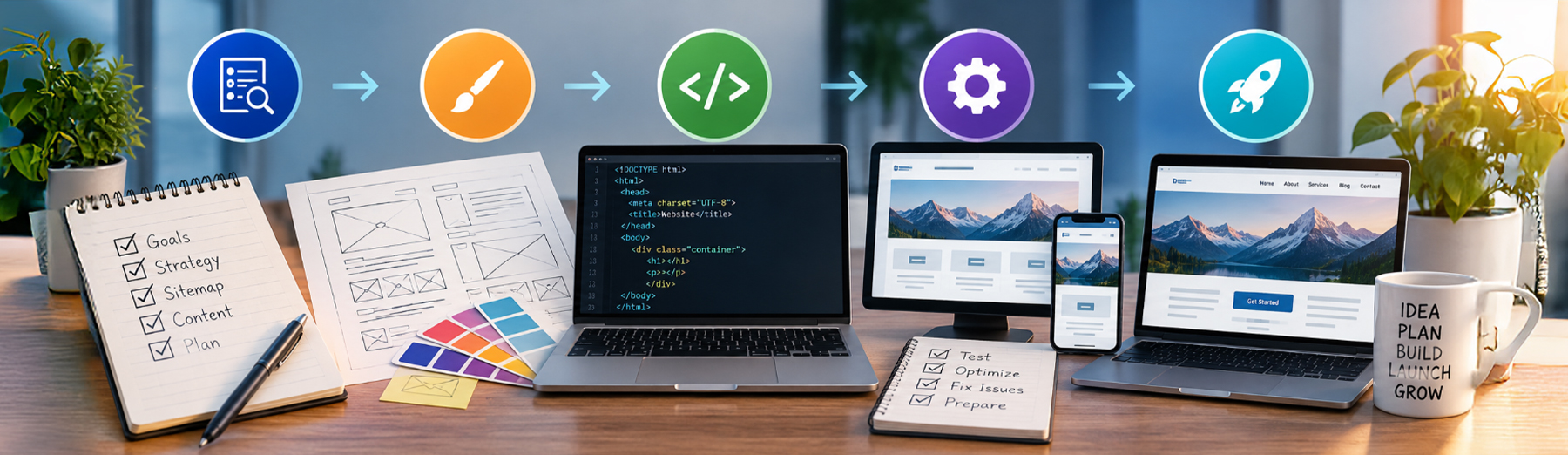
A successful website development process involves more than design and coding. It requires planning, content organization, technical decisions, testing, SEO preparation, and a structured launch process to make sure the site supports both users and business goals.

What Is the Website Development Process?
The website development process is the structured series of steps used to plan, design, build, test, launch, and maintain a website.
A strong process helps keep the project organized while making sure business goals, user needs, content, SEO, performance, and technical requirements are considered before the site goes live.
The process typically includes:
- Discovery and goal setting
- Website planning and strategy
- Sitemap and content structure
- Wireframes or page layout planning
- Visual design
- Content preparation
- Front-end and back-end development
- WordPress or CMS configuration
- SEO and technical setup
- Responsive testing
- Performance optimization
- Quality assurance
- Launch preparation
- Post-launch monitoring and maintenance
Each stage builds on the one before it. Skipping planning or testing can create problems later, especially when the website includes custom functionality, integrations, ecommerce, or SEO-sensitive content.
Development Tip: A clear process reduces rework, improves quality, and helps the website launch with fewer technical and usability issues.
Discovery and Goal Setting
Every successful website project should begin with a clear understanding of what the website needs to accomplish. Discovery helps define the business goals, target audience, required functionality, content needs, and technical requirements before design or development begins.
Key discovery questions may include:
- What are the primary goals of the website?
- Who is the target audience?
- What services, products, or information need to be featured?
- What actions should visitors take?
- Which pages and content are required?
- Are there existing SEO rankings or URLs that need to be preserved?
- What integrations or third-party tools are needed?
- Will the site require ecommerce, forms, memberships, or custom functionality?
- What branding guidelines already exist?
- What technical limitations exist on the current website?
- What are the timeline and budget expectations?
Clear discovery reduces uncertainty and helps prevent major changes later in the project.
Planning Tip: The more clearly the goals and requirements are defined at the beginning, the easier it is to make better design, content, and development decisions throughout the project.
Sitemap and Content Structure Planning
Once the goals and requirements are clear, the next step is organizing the website into a logical structure. A sitemap helps define the main pages, supporting content, navigation paths, and relationships between sections before development begins.
A strong sitemap should consider:
- Primary service or product pages
- About and company information
- Contact and conversion pages
- Resource or blog sections
- Ecommerce categories and product pages
- Landing pages for campaigns
- Navigation hierarchy
- Internal linking opportunities
- SEO-friendly URL structure
- Future content expansion
Content planning should happen alongside the sitemap so each page has a clear purpose and supports the overall user journey.
This stage helps prevent duplicate or unnecessary pages and makes it easier to build a site that is organized for both visitors and search engines.
Structure Tip: A clear sitemap creates the foundation for better navigation, stronger internal linking, and a more scalable website architecture.
Wireframes and Page Layout Planning
Before visual design and development begin, wireframes can help define how content, navigation, calls to action, forms, and other page elements should be arranged.
Wireframes focus on structure and usability rather than colors, typography, or final imagery.
They can help plan:
- Header and navigation placement
- Hero sections and primary messaging
- Content hierarchy
- Service or product sections
- Calls to action
- Forms and lead-generation areas
- Image and media placement
- Testimonials or trust signals
- Footer structure
- Mobile layout priorities
Wireframes also make it easier to identify usability problems early, before time is spent on final design or development.
UX Planning Tip: Wireframes help establish the page structure first, so visual design can enhance the user experience instead of trying to fix structural problems later.
Visual Design and Brand Direction
Once the structure is defined, visual design turns the wireframes into a polished interface that reflects the brand and supports the intended user experience.
Design decisions should consider:
- Brand colors and typography
- Logo usage
- Spacing and visual hierarchy
- Button and link styles
- Image and icon direction
- Consistent page templates
- Mobile and tablet behavior
- Accessibility and contrast
- Calls to action
- Trust-building elements
- Overall consistency across the site
The goal is not simply to make the website look attractive. The visual system should make content easier to understand, reinforce credibility, and support the actions users need to take.
Design Tip: Strong visual design should reinforce the website strategy, not compete with it.
Content Preparation and On-Page SEO
Content should be prepared before or alongside development so each page has a clear purpose, supports user intent, and can be structured properly for search visibility.
Content preparation may include:
- Page titles and headings
- Service or product descriptions
- Calls to action
- FAQs
- Internal linking
- Image alt text
- Metadata
- Structured data opportunities
- Content hierarchy
- SEO-friendly URLs
- Supporting trust and proof elements
- Content updates or migration from the existing site
Preparing content early helps prevent placeholder copy from shaping the final layout and makes it easier to align design, SEO, AEO, and conversion goals from the start.
Content & SEO Tip: Plan content before launch so the website is built around real search intent, clear messaging, and useful information—not temporary filler.
Front-End and Back-End Development
Once the content, layouts, and visual direction are established, development turns the approved plans into a functional website.
Front-end development focuses on what users see and interact with, while back-end development handles the systems, data, integrations, and functionality that support the site behind the scenes.
Development may include:
- Building responsive page templates
- Creating reusable components
- Configuring WordPress or another CMS
- Developing custom functionality
- Connecting forms and third-party integrations
- Setting up ecommerce features
- Implementing navigation and interactive elements
- Adding structured data and technical SEO elements
- Optimizing code, images, and scripts
- Configuring user roles or permissions
- Testing functionality across devices
- Preparing the site for staging and QA
Development should follow the approved design and content structure while also keeping performance, accessibility, maintainability, and scalability in mind.
Development Tip: Good development should make the website reliable today while keeping future updates and expansion practical.
WordPress and CMS Configuration
Once the core development is in place, WordPress or another content management system should be configured so the website is easy to manage, secure, and ready for ongoing updates.
This stage may include:
- Configuring WordPress settings
- Setting up themes and child themes
- Installing and configuring required plugins
- Creating reusable templates and global elements
- Setting user roles and permissions
- Configuring forms and notifications
- Setting media and image options
- Preparing menus and navigation
- Setting permalink structure
- Configuring backups and security tools
- Connecting analytics and tracking
- Reviewing staging and production settings
The goal is to create a manageable backend that supports the website without unnecessary complexity or plugin dependence.
CMS Tip: A well-configured CMS should make routine updates easier while keeping the site stable, secure, and maintainable.
Technical SEO and Search Visibility Setup
Before launch, the website should be reviewed for technical SEO issues that could affect crawling, indexing, search visibility, or the transfer of existing rankings.
Technical SEO setup may include:
- Reviewing page titles and meta descriptions
- Confirming heading structure
- Checking indexability settings
- Reviewing canonical tags
- Creating or updating XML sitemaps
- Verifying robots.txt behavior
- Implementing redirects where URLs change
- Preserving high-value existing URLs
- Reviewing internal linking
- Adding structured data where appropriate
- Checking image alt text
- Connecting Google Search Console
- Reviewing mobile usability and Core Web Vitals
This stage is especially important during redesigns or migrations, where changes to URLs, content, templates, or site architecture can affect existing organic visibility.
Technical SEO Tip: Protect search visibility before launch by reviewing redirects, indexing settings, structured data, and important URLs before the new site goes live.
Responsive Testing and Quality Assurance
Before launch, the website should be tested carefully across devices, browsers, screen sizes, and common user workflows to catch issues that may not be obvious during development.
Quality assurance may include:
- Testing desktop, tablet, and mobile layouts
- Checking navigation and menus
- Testing forms and notifications
- Reviewing links and buttons
- Verifying responsive behavior
- Checking images and media
- Testing ecommerce or checkout functionality
- Reviewing browser compatibility
- Checking page speed and Core Web Vitals
- Confirming accessibility basics
- Testing third-party integrations
- Reviewing redirects and 404 errors
- Checking analytics and tracking
- Proofreading content and metadata
QA helps reduce launch-day problems and ensures the website works consistently before visitors begin using the new version.
For more on building layouts that work across devices, see our guide on Responsive Web Design: Why Mobile-First Design Matters.
QA Tip: Test the complete user journey before launch, not just individual pages. A site can look correct while still having broken forms, links, redirects, or mobile interactions.
Launch Preparation and Going Live
Launching a website should be treated as a controlled process rather than simply switching the new site on. Final checks help reduce downtime, broken links, tracking problems, SEO issues, and other launch-day surprises.
Launch preparation may include:
- Creating a final backup
- Confirming domain and DNS settings
- Verifying SSL and HTTPS
- Reviewing redirects
- Checking forms and email notifications
- Confirming analytics and tracking
- Testing important conversion actions
- Reviewing robots and indexing settings
- Updating XML sitemaps
- Checking canonical URLs
- Clearing site and server caches
- Testing key pages after DNS changes
- Monitoring for 404 errors
- Verifying search engine access
After the site goes live, the most important pages and functions should be tested again in the production environment.
Launch Tip: A successful launch includes verification after the site is live, not just preparation before the switch.
Post-Launch Monitoring and Ongoing Maintenance
The website development process does not end when the site goes live. Ongoing website maintenance helps identify problems that may only appear in the production environment and keeps the site secure, stable, and effective over time.
Post-launch tasks may include:
- Monitoring uptime and server performance
- Checking forms and notifications
- Reviewing analytics and conversion tracking
- Watching for crawl or indexing issues
- Monitoring Search Console
- Checking for broken links and 404 errors
- Reviewing Core Web Vitals
- Testing backups
- Applying WordPress, theme, and plugin updates
- Monitoring security alerts
- Reviewing user behavior and conversion data
- Making ongoing content and SEO improvements
Regular maintenance helps keep the website secure, stable, and aligned with changing business goals.
Maintenance Tip: Launch is the beginning of the website’s operational life, not the end of the development process.
How Tech Prime Web Manages the Website Development Process
Tech Prime Web approaches website development as a structured process that connects strategy, design, development, SEO, performance, testing, launch, and ongoing support.
Key areas we manage include:
- Project goals and requirements
- Sitemap and content structure
- Responsive layouts and user experience
- WordPress and CMS configuration
- Custom functionality and integrations
- Technical SEO and structured data
- Performance and Core Web Vitals
- Forms, tracking, and conversion setup
- Cross-device and browser testing
- Launch planning and redirects
- Post-launch monitoring
- Ongoing maintenance and optimization
This helps reduce unnecessary rework and ensures the website is built to support both current needs and future growth.
Final Thoughts: From Planning to Launch
A successful website development project depends on more than design and coding. The strongest results come from a structured process that connects business goals, content, user experience, development, SEO, testing, launch preparation, and ongoing maintenance.
Each stage helps reduce risk and creates a stronger foundation for the next. Clear planning can prevent rework, careful development can improve maintainability, and thorough testing can help avoid launch-day problems.
The process should also continue after launch through monitoring, updates, performance reviews, and ongoing improvements based on how the website is actually being used.
Final Takeaway: A well-planned website development process helps create a site that is easier to launch, manage, optimize, and grow over time.