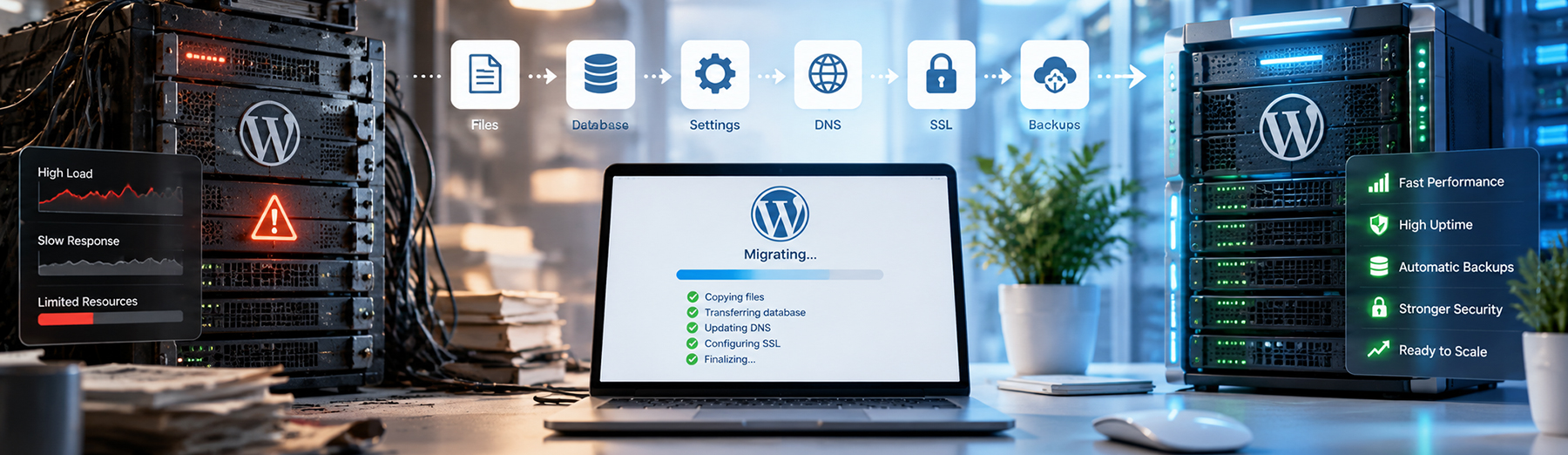
WEBSITE HOSTING
Managed WordPress Hosting vs. Shared Hosting: Which Is Better?

Choosing the right hosting environment can affect website speed, security, reliability, scalability, maintenance, and overall user experience. For WordPress websites, two of the most common options are shared hosting and managed WordPress hosting.
Shared hosting is usually more affordable and may work well for smaller websites with limited traffic. Managed WordPress hosting typically provides a more specialized environment with stronger performance, security, backups, staging tools, and WordPress-specific support.

What Is Shared Hosting?
Shared hosting places multiple websites on the same server environment, where they share resources such as CPU, memory, storage, and bandwidth.
It is often used for smaller websites because it is generally:
- More affordable
- Easier to set up
- Suitable for basic WordPress sites
- Managed through a standard hosting control panel
- Bundled with email, SSL, and other basic hosting features
- Designed for users who do not need advanced server control
Shared hosting can work well for low-traffic websites, small business sites, portfolios, and blogs. However, performance may vary because server resources are shared with other websites on the same environment.
If another site on the server experiences heavy traffic or resource usage, it can sometimes affect overall server performance.
Shared Hosting Tip: Shared hosting can be a practical starting point, but businesses should monitor performance as traffic, plugins, and website complexity increase.
What Is Managed WordPress Hosting?
Managed WordPress hosting is a hosting environment specifically optimized for WordPress websites. The hosting provider handles more of the technical infrastructure, performance, security, backups, caching, and platform maintenance than a typical shared hosting plan.
Common features may include:
- WordPress-optimized server configurations
- Built-in caching
- Automatic backups
- Staging environments
- SSL management
- Security monitoring
- Malware protection
- CDN integration
- Automatic WordPress updates
- Developer tools
- Performance monitoring
- WordPress-focused technical support
Managed hosting is often used for business websites, ecommerce stores, high-traffic sites, and WordPress installations where reliability and performance are important.
The main tradeoff is cost. Managed WordPress hosting is usually more expensive than shared hosting, but the additional tools and support can reduce technical maintenance and improve overall site stability.
Managed Hosting Tip: Managed WordPress hosting is most valuable when the website plays an important role in lead generation, ecommerce, customer service, or other business operations.
Managed WordPress Hosting vs. Shared Hosting: Key Differences
The biggest differences between shared hosting and managed WordPress hosting come down to performance, maintenance, security, support, scalability, and cost.
| Factor | Shared Hosting | Managed WordPress Hosting |
|---|---|---|
| Cost | Usually lower | Usually higher |
| Performance | Shared server resources | WordPress-optimized environment |
| Caching | May require plugins or manual setup | Often built in |
| Backups | Varies by provider | Commonly automated |
| Staging | Often limited or unavailable | Commonly included |
| Security | General hosting protections | More WordPress-specific controls |
| Support | General hosting support | WordPress-focused support |
| Updates | More owner-managed | Often partly automated |
| Scalability | More limited | Usually better suited for growth |
| Developer Tools | Basic | Often more advanced |
| Best For | Smaller or simpler sites | Business-critical WordPress sites |
Shared hosting can be a good fit when cost is the main priority and the website has relatively simple requirements.
Managed WordPress hosting is often a better fit when performance, uptime, security, staging, backups, and technical support are more important to the business.
Hosting Comparison Tip: The cheapest hosting option is not always the lowest-cost option overall. Technical problems, downtime, slow performance, and maintenance time can create indirect costs for a business.
Which Type of Hosting Is Better for Website Performance?
Managed WordPress hosting generally has an advantage when performance is important because the environment is usually optimized specifically for WordPress.
Performance-focused features may include:
- Server-level caching
- CDN integration
- Object caching
- Optimized PHP configurations
- Better resource allocation
- Performance monitoring
- Built-in staging environments
- Database optimization support
- Fewer restrictions on WordPress-specific tools
- Faster support for WordPress-related issues
Shared hosting can still perform well for smaller websites, but performance may become less predictable as traffic, plugins, and website complexity increase.
For business websites that depend on leads, ecommerce, or other conversions, more consistent performance can be worth the higher hosting cost.
For a deeper look at how performance influences rankings, engagement, and leads, see our guide on How Website Speed Affects SEO, Conversions and User Experience.
Performance Tip: Hosting should be evaluated by real website performance and reliability—not only by storage, bandwidth, or advertised features.
Which Type of Hosting Is Better for Security?
Managed WordPress hosting often provides more WordPress-specific security controls than standard shared hosting, although the exact protections vary by provider.
Security-focused features may include:
- Web application firewall protection
- Malware scanning and monitoring
- Automatic backups
- SSL management
- WordPress-specific security rules
- Login protection
- Bot and rate-limit controls
- Server monitoring
- Automated platform updates
- Security-focused technical support
Shared hosting usually includes basic server security, but more of the WordPress-specific protection may need to be configured through plugins, external services, or manual maintenance.
For business websites that handle leads, customer accounts, ecommerce, or other important data, stronger hosting-level protection can reduce reliance on WordPress plugins alone.
Hosting Security Tip: Evaluate what security protections are included at the server level before adding overlapping WordPress security plugins.
Which Type of Hosting Is Easier to Manage?
Shared hosting is often straightforward for basic websites, but the site owner may be responsible for more of the WordPress-specific maintenance, optimization, backups, and troubleshooting.
Managed WordPress hosting typically reduces that workload by providing tools and support designed specifically for WordPress.
Management features may include:
- Automated backups
- Staging environments
- One-click restore points
- Built-in caching
- WordPress-focused support
- Simplified SSL management
- Site cloning or migration tools
- Performance monitoring
- Automated update options
- Developer workflows
For businesses without dedicated technical staff, managed hosting can reduce the amount of time spent maintaining the hosting environment.
Management Tip: Consider the time required to manage the website, not just the monthly hosting price. A lower-cost plan may require more hands-on maintenance and troubleshooting.
When Is Shared Hosting the Better Choice?
Shared hosting can still be the right option when a website has relatively simple requirements and cost is a major consideration.
It may be a good fit for:
- Small brochure-style websites
- Personal or portfolio sites
- Low-traffic blogs
- Early-stage businesses
- Websites with limited plugins
- Sites without ecommerce or complex integrations
- Temporary or development projects
- Businesses with modest performance requirements
Shared hosting can provide good value when the website does not require advanced performance, staging, specialized security, or WordPress-specific support.
Shared Hosting Tip: Choose shared hosting when it matches the site’s actual needs. Paying for advanced managed features may not provide much value for a small, simple website.
When Is Managed WordPress Hosting the Better Choice?
Managed WordPress hosting is usually a better fit when the website plays an important role in generating leads, processing sales, supporting customers, or running business operations.
It may be a stronger option for:
- Business-critical WordPress websites
- WooCommerce stores
- High-traffic websites
- Lead-generation websites
- Sites with complex plugins or integrations
- Businesses that need staging environments
- Teams that want automated backups and restores
- Websites that require stronger performance controls
- Businesses that want WordPress-focused support
- Sites expected to grow in traffic or functionality
The added cost can make sense when better reliability, support, security, and performance reduce downtime or technical maintenance.
Managed Hosting Tip: Managed WordPress hosting delivers the most value when website performance and reliability directly affect leads, sales, or day-to-day business operations.
Does Web Hosting Affect SEO?
Hosting does not determine search rankings by itself, but the hosting environment can influence technical factors that support SEO, including speed, uptime, crawlability, security, and overall site reliability.
Hosting-related SEO issues can include:
- Slow server response times
- Frequent downtime
- Poor Core Web Vitals
- Resource limits that affect page loading
- SSL or HTTPS problems
- Server errors during crawling
- Slow database performance
- Inconsistent performance during traffic spikes
A stronger hosting environment can help create a more stable technical foundation for SEO, especially on larger WordPress sites, ecommerce stores, and websites that depend heavily on organic traffic.
For businesses dealing with hosting-related speed, crawlability, or technical performance issues, Technical SEO Services can help identify problems that may be affecting search visibility.
SEO Hosting Tip: Choose hosting based on consistent performance and reliability, not simply advertised storage or bandwidth.
How Hosting Affects Website Scalability
As a website grows, hosting needs can change. More traffic, plugins, ecommerce activity, media, database queries, and third-party integrations can increase server resource usage.
A scalable hosting environment should be able to handle:
- Traffic growth
- Larger product or content databases
- More concurrent users
- Increased form or checkout activity
- Additional plugins and integrations
- Higher media usage
- More complex database queries
- Traffic spikes from marketing campaigns
- Seasonal ecommerce demand
- Future development needs
Shared hosting can become restrictive as resource requirements increase, while managed WordPress hosting is often better suited for websites expected to grow in traffic, complexity, or business importance.
Scalability Tip: Choose hosting based not only on what the website needs today, but also on how traffic, functionality, and business requirements may grow over time.
How Much Does Managed WordPress Hosting Cost Compared With Shared Hosting?
Shared hosting is usually the lower-cost option, while managed WordPress hosting typically costs more because it includes additional performance, security, backup, staging, and support features.
The price difference can reflect:
- Server resources
- Backup frequency
- Staging environments
- Built-in caching
- CDN services
- Security monitoring
- WordPress-specific support
- Traffic allowances
- Number of websites
- Developer tools
- Ecommerce support
For a small website, shared hosting may provide everything that is needed at a lower monthly cost. For a business-critical site, the higher cost of managed hosting may be easier to justify if it reduces downtime, troubleshooting, maintenance time, or performance problems.
Hosting Cost Tip: Compare the total value of the hosting environment, not just the monthly price. Support, backups, security, performance, and maintenance time can all affect the real cost of hosting.
When Should You Move From Shared Hosting to Managed WordPress Hosting?
A website may outgrow shared hosting when performance, reliability, security, or technical requirements begin to exceed what the current plan can comfortably support.
Common signs include:
- Slow page loads despite optimization
- Frequent resource-limit warnings
- Downtime during traffic spikes
- Growing WooCommerce activity
- Increasing database size
- More complex plugins or integrations
- Recurring security or malware concerns
- Need for staging environments
- Limited backup or restore options
- Inconsistent server performance
- Increasing maintenance time
- Website problems beginning to affect leads or sales
Moving to managed WordPress hosting can make sense when the website becomes important enough that slow performance, downtime, or technical limitations create a measurable business risk.
For more warning signs, see when it may be time to move your WordPress website to better hosting.
Migration Tip: Do not wait for the current hosting environment to fail completely. If hosting limitations are repeatedly affecting performance or reliability, it may be time to evaluate a stronger platform.
How Tech Prime Web Helps Businesses Choose the Right Hosting
The right hosting choice depends on more than price. Website traffic, performance requirements, security needs, ecommerce activity, integrations, maintenance workload, and future growth all affect which hosting environment makes the most sense.
Tech Prime Web evaluates factors such as:
- Current website performance
- Traffic and resource usage
- WordPress configuration
- Plugin and theme complexity
- WooCommerce requirements
- Security and backup needs
- Staging and development workflows
- Reliability and uptime concerns
- Scalability requirements
- Ongoing maintenance needs
The goal is to choose a hosting environment that supports the website’s actual business requirements without paying for unnecessary features or staying on a platform that has become too limiting.
For businesses planning a hosting change, migration, or technical review, Tech Prime Web can help assess the current environment and recommend the best path forward.
Final Thoughts: Choosing Between Managed WordPress Hosting and Shared Hosting
Shared hosting and managed WordPress hosting can both be good choices when they match the website’s actual needs.
Shared hosting is often a practical option for smaller, simpler websites where cost is the main priority. Managed WordPress hosting is usually better suited for business-critical sites that need stronger performance, security, backups, staging, scalability, and WordPress-focused support.
The best decision comes from balancing cost with the website’s traffic, complexity, business importance, and future growth.
Final Takeaway: Choose hosting based on the value the website provides to the business. If performance, reliability, security, or maintenance problems begin affecting leads, sales, or operations, a more capable hosting environment may be worth the additional cost.